
Introduction
Online education has changed the way people learn, teach, and share knowledge across the world. In recent years, edtech tools for online classes have become a core part of digital learning. From virtual classrooms to interactive quizzes, these tools make online education more engaging, flexible, and effective for both students and teachers. Whether you are a teacher, student, school owner, or trainer, understanding how these tools work can help you achieve better learning outcomes.
Edtech tools for online classes are designed to support communication, content delivery, assessment, and collaboration. They reduce the gap between traditional classrooms and digital learning environments. With the right tools, teachers can manage classes smoothly, students can stay motivated, and parents can track progress easily. The growing demand for remote learning has made these tools more advanced, affordable, and user-friendly than ever before.
In today’s fast-moving world, online education is no longer a backup option. It has become a primary mode of learning for many institutions. That is why knowing how to choose and use the right edtech tools for online classes is essential. This guide will help beginners and intermediate users understand everything clearly, step by step, without technical confusion. By the end of this article, you will have a complete understanding of how these tools work, why they matter, and how to use them effectively for online teaching and learning.
What Is EdTech Tools for Online Classes?
Edtech tools for online classes are digital platforms, software, and applications that support teaching and learning through the internet. These tools help teachers create lessons, deliver lectures, assign homework, conduct tests, and interact with students in real time or through recorded content.
In simple words, edtech tools act as a virtual classroom. They replace or support physical classrooms by providing features such as video conferencing, file sharing, attendance tracking, quizzes, and progress monitoring. Some tools focus on live classes, while others are designed for self-paced learning.
Examples of edtech tools for online classes include learning management systems, video meeting platforms, digital whiteboards, quiz tools, and collaboration apps. Each tool plays a different role but works together to create a smooth learning experience.
These tools are widely used in schools, colleges, coaching centers, and corporate training programs. Even individual tutors use them to teach students from different locations. As technology improves, edtech tools are becoming smarter, more interactive, and more personalized to suit different learning styles.
Why Is EdTech Tools for Online Classes Important?
Edtech tools for online classes are important because they make learning more accessible, flexible, and efficient. They remove geographical barriers and allow students to learn from anywhere in the world.
One major reason for their importance is flexibility. Students can attend classes from home, watch recorded lectures, and study at their own pace. Teachers can manage multiple classes, reuse content, and track student performance easily.
Another important reason is engagement. Traditional online lectures can feel boring, but edtech tools add quizzes, polls, videos, and interactive activities that keep students interested. This improves focus and learning outcomes.
These tools also help teachers save time. Automated attendance, grading systems, and content sharing reduce manual work. Teachers can focus more on teaching instead of administration.
Edtech tools also support personalized learning. Students can learn according to their speed and understanding level. Weak students get extra practice, while advanced learners can move ahead faster.
Finally, edtech tools prepare students for the digital world. Using technology in education improves digital skills, communication abilities, and self-learning habits, which are essential for future careers.
Detailed Step-by-Step Guide

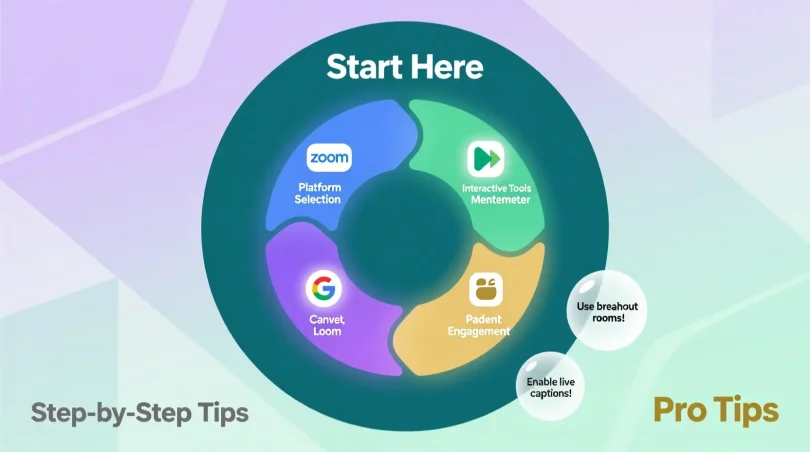
Step 1: Identify Your Learning or Teaching Goals
Before choosing any edtech tools for online classes, it is important to define your goals. Are you teaching school students, college learners, or professionals? Do you want to conduct live classes or share recorded lessons?
Clear goals help you choose tools that match your needs. For example, live teaching requires video conferencing tools, while recorded courses need content management platforms.
Step 2: Choose the Right Learning Management System
A Learning Management System, or LMS, is the backbone of online education. It helps manage courses, students, assignments, and assessments in one place.
Popular LMS platforms allow teachers to upload study material, create quizzes, track progress, and communicate with students. For beginners, it is best to choose a simple and user-friendly LMS.
Step 3: Select Video Conferencing Tools
Live classes are an important part of online learning. Video conferencing tools allow teachers to interact with students in real time.
Good tools offer features such as screen sharing, chat options, breakout rooms, and session recording. These features make online classes more interactive and effective.
Step 4: Use Digital Whiteboards and Presentation Tools
Digital whiteboards help teachers explain concepts visually. They are useful for subjects like math, science, and diagrams.
Presentation tools allow teachers to create engaging slides with images, videos, and animations. This improves understanding and keeps students interested.
Step 5: Add Assessment and Quiz Tools
Assessment is an important part of learning. Quiz and test tools help teachers check student understanding regularly.
These tools can create multiple-choice questions, short answers, and timed tests. Automatic grading saves time and gives instant feedback to students.
Step 6: Use Collaboration and Communication Tools
Online learning should not feel isolated. Collaboration tools allow students to work in groups, share ideas, and discuss topics.
Discussion boards, chat tools, and group projects encourage teamwork and improve communication skills.
Step 7: Track Progress and Performance
Tracking progress helps teachers understand student performance. Analytics tools provide reports on attendance, test scores, and participation.
This data helps teachers identify weak areas and improve teaching strategies accordingly.
Step 8: Ensure Data Safety and Privacy
Security is very important in online education. Choose tools that offer data encryption, secure login, and privacy controls.
This protects student information and builds trust among users.
Benefits of EdTech Tools for Online Classes
- Improve access to education for students in remote areas
- Support flexible learning schedules
- Increase student engagement through interactive content
- Save time with automated tasks and grading
- Allow personalized learning experiences
- Improve communication between teachers and students
- Enable easy sharing of study material
- Support multimedia learning methods
- Help track student performance effectively
- Reduce dependency on physical classrooms
Disadvantages / Risks
- Dependence on internet connectivity
- Technical issues can interrupt learning
- Lack of face-to-face interaction
- Students may feel distracted at home
- Requires basic digital skills
- Data privacy concerns if tools are not secure
- Screen fatigue due to long online sessions
Common Mistakes to Avoid
Many educators and students make mistakes while using edtech tools for online classes. One common mistake is using too many tools at once, which creates confusion instead of convenience. It is better to select a few reliable tools and use them properly.
Another mistake is ignoring training. Teachers and students should spend time learning how to use the tools effectively. Without proper training, even the best tools fail to deliver results.
Poor internet planning is also a major issue. Online classes require stable internet connections. Backup plans should always be in place.
Some teachers focus too much on technology and forget teaching quality. Tools should support learning, not replace good teaching methods.
Lastly, not taking feedback from students is a mistake. Feedback helps improve the online learning experience and fix problems early.
FAQs
What are edtech tools for online classes?
Edtech tools for online classes are digital platforms and software used to conduct, manage, and improve online learning. They include tools for video classes, assessments, content sharing, and communication.
Are edtech tools suitable for beginners?
Yes, many edtech tools are designed for beginners. They have simple interfaces and step-by-step guides that make them easy to use for both teachers and students.
Can edtech tools replace traditional classrooms?
Edtech tools cannot fully replace traditional classrooms, but they can effectively support and enhance learning. They are especially useful for remote and hybrid education models.
Do students need technical skills to use these tools?
Basic computer and internet skills are enough to use most edtech tools. With regular use, students quickly become comfortable with them.
Are edtech tools expensive?
Some edtech tools are free, while others offer paid plans with advanced features. Many platforms provide affordable options suitable for schools and individuals.
How do edtech tools help teachers?
They help teachers manage classes, track progress, create assessments, save time, and improve student engagement through interactive learning methods.
Expert Tips & Bonus Points
Choose tools that match your teaching style and student needs instead of following trends. Simplicity always works better than complexity.
Test all tools before using them in live classes to avoid technical issues. Preparation builds confidence and ensures smooth sessions.
Encourage student participation through quizzes, discussions, and activities. Active learning improves understanding and retention.
Keep sessions short and engaging. Long online classes reduce attention and cause fatigue.
Regularly update your content to keep it fresh and relevant. Outdated material reduces student interest.
Always collect feedback and make improvements based on student responses. Continuous improvement leads to better learning outcomes.
Conclusion
Edtech tools for online classes have transformed the education system in powerful ways. They have made learning more accessible, flexible, and engaging for students of all ages. From live classes and digital assessments to collaboration and performance tracking, these tools offer complete support for modern education.
When used correctly, edtech tools for online classes improve teaching quality and student participation. They help educators manage time efficiently and allow learners to study at their own pace. However, success depends on choosing the right tools, using them properly, and maintaining a balance between technology and teaching.
As online education continues to grow, the role of edtech tools will become even more important. Schools, teachers, and students who adapt to these tools early will benefit the most. By understanding their features, advantages, and limitations, anyone can create an effective and engaging online learning environment.
With the right approach, edtech tools for online classes can turn digital learning into a powerful, enjoyable, and result-driven experience for everyone involved.